
Telescope for iPhone: Your Phone Model Doesn't Matter, Your Eyepiece Does
Universal adapters fit nearly every phone and standard 1.25-inch eyepieces, and cost about $20 to $50. Aim at the Moon, which comes out beautifully. Jupiter's four moons show as dots beside it. It's a $25 hobby, not the $1,300 one.
 Ray Ostrander · Updated July 24, 2026 · how I decide
If you buy through a link here, the site earns a little. It's never why anything gets picked.
Good news that saves you a lot of worry: your iPhone model doesn’t matter. Universal adapters fit nearly every modern phone and standard 1.25-inch eyepieces, and they cost about $20 to $50. What actually decides your photos is your eyepiece and your target, not whether you have a 15, a 16, or a 17. Aim at the Moon, which comes out beautifully. Jupiter’s four moons will show as bright dots beside it, though its cloud stripes probably won’t. And trying to hold the phone up to the eyepiece by hand is much harder than it sounds, which is exactly what the little clamp fixes.
I want to be clear about what this page is and isn’t, right up front. This is the twenty-five-dollar version of photographing the sky: your phone, a clamp, and your telescope’s eyepiece, pointed at the Moon. It isn’t the serious astrophotography hobby, the tracking mounts and the stacking software and the thousand-dollar rigs. That’s a wonderful world and it’s a different neighbor’s garage. Here, we’re doing the thing a normal person actually wants: keeping a good photo of the Moon to show somebody.
What's on this page
- The variable you're worried about is the wrong one
- The $25 hobby and the $1,300 hobby aren't the same thing
- What you'll actually capture, in order
- Why holding it by hand fails, and what the clamp does
- The three things that matter in an adapter
- One important thing this page skips
- A word for people who don't own a telescope yet
- Questions people actually ask
- What I'd actually do
The variable you’re worried about is the wrong one
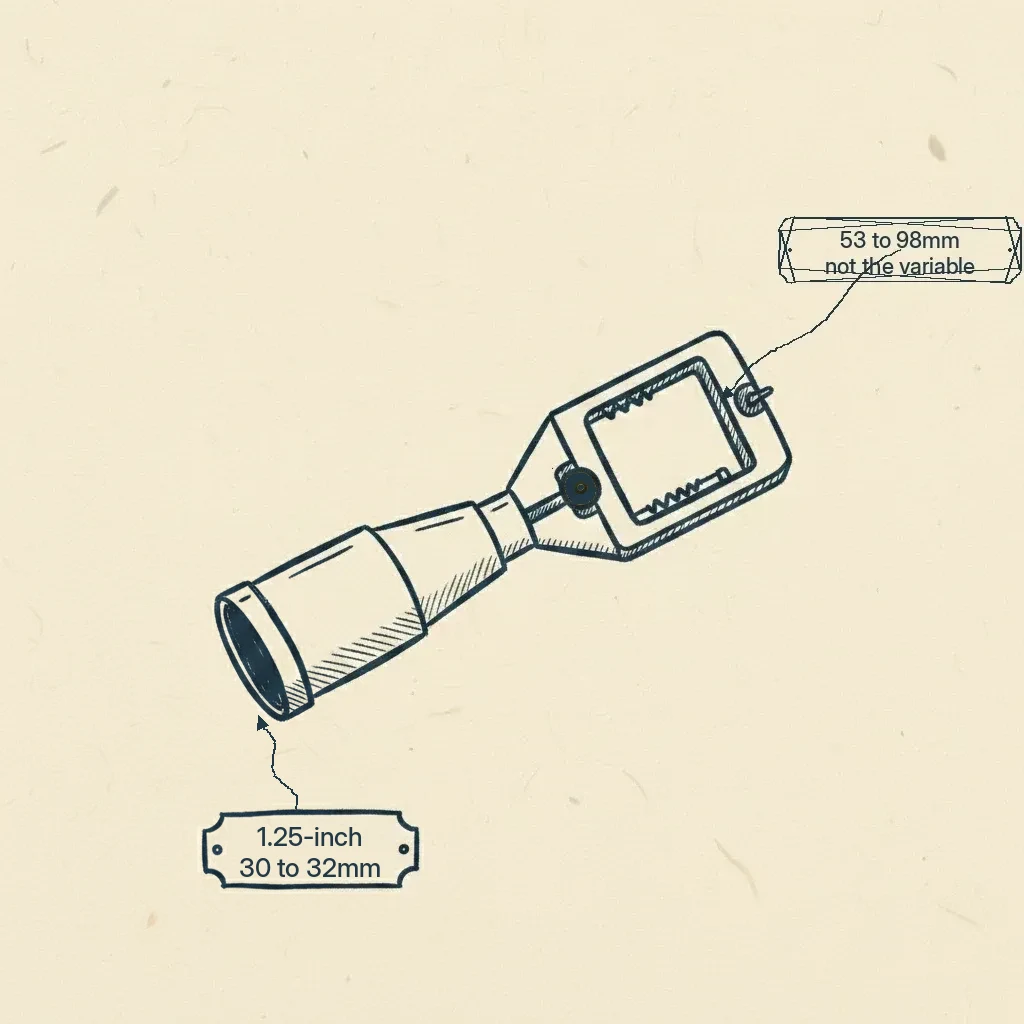
Here’s what’s actually happening, and it’s the whole reason this page exists. People search for this by iPhone model, “telescope for iPhone 16 Pro Max,” as if the answer changes with the phone. It doesn’t. The adapters that hold a phone to a telescope are universal: they fit phones roughly 53 to 98 millimeters wide, which covers essentially every smartphone made, and they grip standard 1.25-inch eyepieces, the size the vast majority of telescopes use.
So the thing you’re anxious about, your phone, is the one part that doesn’t matter. And the thing that actually decides whether the clamp fits, your eyepiece, is probably something you’ve never thought about. That’s the little tube you look through, and it’s the piece the adapter actually grabs onto. Check that number, 1.25-inch on most scopes, and stop worrying about your phone entirely.
The $25 hobby and the $1,300 hobby aren’t the same thing
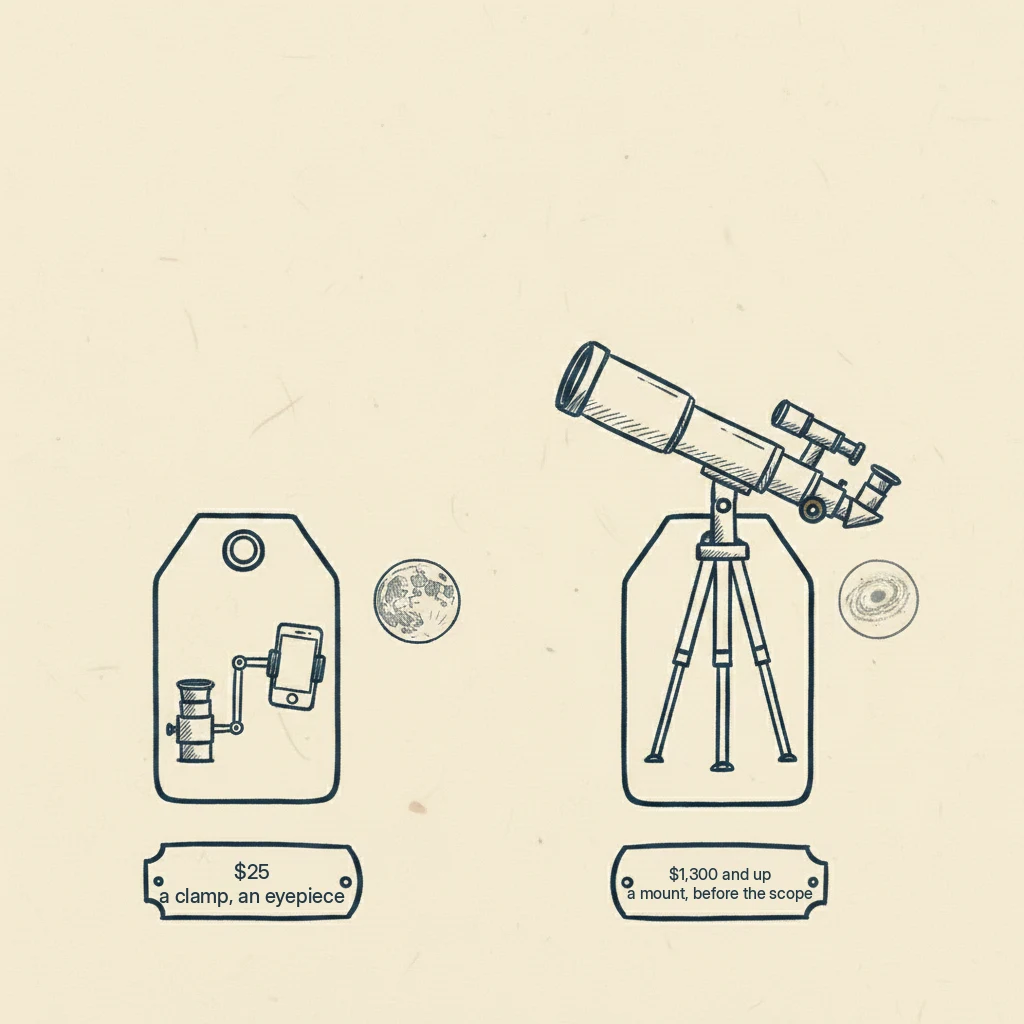
This is the distinction that will save you either a lot of money or a lot of disappointment, so let me be precise. When people picture “astrophotography,” they picture a deep, glowing galaxy. Getting that faint galaxy to show up at all requires cancelling out the Earth’s rotation for minutes at a time, which takes a special motorized mount that, on its own, before you’ve even bought a telescope, runs well past a thousand dollars.
The Moon needs none of that. The Moon is brilliant, huge, and completely indifferent to the fact that the Earth is turning. Here’s what’s actually happening: those are two entirely different problems wearing the same word. The Moon costs about twenty-five dollars to photograph, and the galaxy costs well over a thousand, and almost nobody tells you they’re separate hobbies. If the deep-sky version is what’s calling you, that’s a real and beautiful pursuit, and I point you honestly toward it, and its true costs, on best telescope for astrophotography. This page is the cheap, joyful, Moon-and-planets version.
What you’ll actually capture, in order
Set your expectations before you point the phone, because the honest picture is genuinely exciting once you know it. The magazine astronomers lay out the order plainly, and it happens to be exactly the order I’d give a kid.
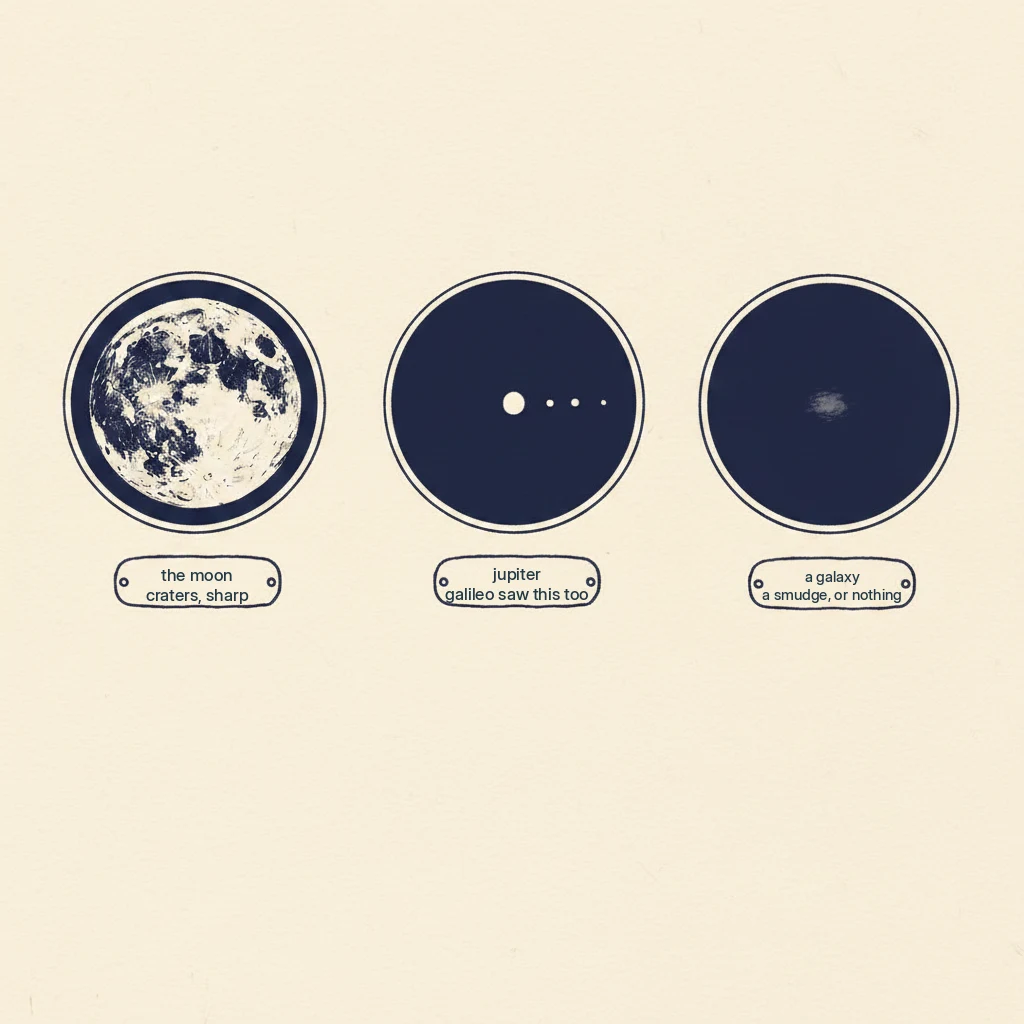
Start with the Moon. It comes out better than you expect: craters, the sharp shadow line, real texture. It’s the guaranteed win and the one to try first. Then Jupiter, where you’ll capture a bright dot with four smaller dots strung out beside it. Those four dots are Jupiter’s big moons, the same ones Galileo drew in 1610, and a phone photo of them is a genuinely astonishing, keepable thing. What probably won’t come out is Jupiter’s cloud stripes, not through a modest scope, so don’t be let down when the planet itself is just a bright dot. And the deep-sky galaxy in your head? The experts are honest that deep-sky objects often just don’t show up well on a phone screen. Bigger, brighter clusters and nebulae can be captured with patience, but the faint spiral you’re imagining will likely not appear at all.
That order, the Moon first, then the planets, then maybe the faint stuff or maybe never, is the whole philosophy of this site, and it’s just as true through a camera as through your eye. Start where success is guaranteed.
And here’s a thing worth holding onto while you frame that Moon. The light landing on your phone’s sensor is real light that bounced off those mountains and crossed the distance to reach you. Point a telescope at your own eye and that photon ends its journey there and is gone. Point it at your phone, and now you get to keep it. That’s what this twenty-five-dollar setup really does: it lets an ordinary person hold on to a real photon from the Moon.
Why holding it by hand fails, and what the clamp does
You’ve probably already tried the free version: hold the phone up to the eyepiece, chase the little floating circle of the Moon around with your hand, and get a grey, blurry smear for your trouble. That’s not you being clumsy. The magazine folks say plainly that keeping the camera lens perfectly lined up by hand is much more difficult than it sounds, that in low light the phone usually gets the focus wrong and blows the exposure, and that images go very grainy if you pinch to zoom.
The fix is a smartphone telescope adapter, the little clamp that holds your phone rock-steady and centered over the eyepiece so the camera and the eyepiece stay lined up. That one piece of plastic and metal is the difference between the grey smear and a photo worth sending.
That said, before you buy anything, go outside on the next clear night and just try it by hand on the Moon. The Moon is big and bright and forgiving enough that you might get something you like for free, and you’ll learn exactly why the clamp helps. Then buy the clamp if you want the good shots reliably.
The three things that matter in an adapter
When you do buy one, the makers and guides point at three things, and they’re the whole spec:
- Does it fit your eyepiece? This is the one that matters most. Match the adapter’s grip to your eyepiece diameter, 1.25-inch on most scopes.
- Does it adjust in all directions? A good adapter lets you nudge the phone up, down, and sideways to center the camera exactly over the eyepiece. That fine adjustment is most of the battle.
- Does the clamp hold a big phone without slipping? Modern phones are large and heavy, and a weak clamp lets them droop off-center.
A roughly $15 budget clamp and a $50 precision mount both produce excellent results when used correctly, so this isn’t a place you have to spend up. All researched, none of it handled by anyone here, and the prices I’m seeing on the adapter shelf are approximate, roughly $20 to $50 across the common universal models.
One important thing this page skips
The Sun needs certified solar equipment, and I’m not covering solar photography here. If that’s what you’re after, get proper certified gear and guidance from a source that specializes in it.
A word for people who don’t own a telescope yet
If you searched this without owning a scope, here’s the honest steer. Don’t buy a cheap telescope just because the box brags about a smartphone adapter. A flimsy telescope with a shaky tripod is a poor telescope no matter what accessory it ships with, and the adapter can’t fix a wobbly mount or bad optics. The adapter is a twenty-five-dollar add-on for a telescope you already have. If you don’t have one yet, you’re really shopping for a first telescope, which is its own decision, and I’d send you to best cheap telescope or telescope for beginners first. Get a good scope, then a five-dollar-bill’s worth of clamp, and you’re set.
Questions people actually ask
Does it matter which iPhone I have for a telescope adapter?
No. Universal smartphone adapters fit phones roughly 53 to 98 millimeters wide, which is essentially every iPhone and Android made, old or new. The 15, 16, and 17 all work the same way. What actually has to match is your telescope’s eyepiece, usually a standard 1.25-inch size. Shop by your eyepiece, not your phone.
What can you actually photograph with a phone through a telescope?
The Moon, wonderfully, that’s the one to start with. Jupiter’s four big moons show as dots beside a bright dot of a planet, which is a real thrill, though Jupiter’s cloud stripes usually won’t come out on a modest scope. Bright star clusters are doable. Faint galaxies and nebulae mostly don’t show up on a phone screen, so don’t expect the Hubble-style pictures.
Do I need a special adapter, or can I just hold my phone up?
You can hold it by hand, and for the bright, forgiving Moon it’s worth trying for free first. But keeping the phone lined up over the eyepiece by hand is genuinely fiddly, the focus and exposure often go wrong, and zooming makes it grainy. A simple adapter clamp, about $20 to $50, holds everything steady and centered and turns the grey smear into a keeper.
Is a phone photo through a telescope any good?
For the Moon, surprisingly yes, because it’s so bright and close that a phone sensor handles it well when the focus is sharp. For planets it’s decent as a record of what you saw. For faint deep-sky objects, not really, that’s where the expensive tracking-mount hobby begins. Set your sights on the Moon and planets and you’ll be genuinely pleased.
What I’d actually do
Point your scope at the Moon on the next clear night and try your bare phone first, just to see. If you like it, spend $20 to $50 on a universal adapter that fits your 1.25-inch eyepiece, ignore your phone’s model entirely, and start collecting Moons and the occasional Jupiter-with-four-moons. Keep your expectations on the Moon and planets, send the best one to somebody who’d smile at it, and let the thousand-dollar galaxy hobby wait until you’re sure you want it.
A few things you’re probably also wondering:
- Want the honest truth about the deep-sky, tracking-mount version? See best telescope for astrophotography.
- Not sure what the planets even look like first? See telescope to see planets.
- Don’t own a telescope yet? Start at best cheap telescope.
- Wondering about camera binoculars instead? See binoculars that take pictures.
- Have a spotting scope, not a telescope? See spotting scope for astronomy.
Ray Ostrander
Ray spent three decades explaining the sky to twelve-year-olds and their parents, and every January, hearing which Christmas telescopes ended up in the closet. He doesn't own a wall of gear and won't pretend to. He reads everything, tells you what owners agree on, and flags what's just his judgment. His goal is simple: no more January closets.